Web analytics consulting
Web analytics consulting puts a website’s measurement in order, so that the numbers in Google Analytics 4 (GA4), the ad platforms and the store or the customer relationship management system (CRM) are reliable and can be compared with each other. I do the audit, the measurement plan and the setup myself: the tag manager (Google Tag Manager or Cloudflare Zaraz), the cookie banner, GA4, ad conversions and server-side tracking, and I document how it works.

When you need web analytics consulting
Web analytics consulting is needed when decisions should rest on the numbers, and nobody can tell whether the numbers are true. These are the situations in which companies most often look for help:
GA4 shows something different from the store or the ad platform. You can’t tell which number to trust, or whether the gap is still acceptable.
An order or a lead is counted twice. The ad platform reports more results than the store or the bank account shows.
A conversion doesn’t arrive, even though the test passes. Everything works in preview, and real orders and form submissions are still missing.
Traffic dropped after the cookie banner went live. By more than the share of people who decline.
The numbers changed after a redesign or a migration. The site works, and you can’t tell whether measurement does.
Nobody trusts the report. Marketing gives one number, sales another, and nothing says what each event means.
You’re about to launch, or you want a second opinion. You want measurement right from day one, or you want someone to look over an existing setup or a proposal.
Mismatched numbers: why GA4, the store and the ad platform disagree
The gap between GA4, the store and the ad platform is partly natural, because the three systems count different things in different ways; the rest is a measurement fault. The first job of the audit is to separate the two:
They count different things. The store and the CRM record the actual order and the actual lead. GA4 records what it received from the browser: someone who declines cookies or uses an ad blocker is partly or wholly missing.
They book to different days. Google Ads books a conversion to the day of the click; GA4 books it to the day the conversion happened. A week’s or a month’s total won’t match even when both measure correctly.
They credit different sources. The ad platform ties the result to its own clicks. GA4 spreads credit across all channels, so the same order may count there as coming from search or from a newsletter.
They count differently. In Google Ads each conversion action can be set to count one or every conversion after a click. If that doesn’t line up with what GA4 counts, the totals won’t either.
And some of it is a fault. A purchase event lost on the return from the payment page, a tag firing twice, a lost campaign parameter (UTM), the wrong currency or tax. These can be fixed.
As for which number to use for what: the store or the CRM for revenue, GA4 for comparing channels, the ad platform for tuning campaigns. In the audit I reconcile the systems order by order, and say how much of the gap the points above explain, and how much is a fault.
Web analytics audit: what I check
A web analytics audit goes through seven areas, on your website and in your accounts:
Measurement plan and event names. I check whether it is written down what you measure and why: which events matter, what they are called, what data travels with them. If the same thing runs under three names, or nobody knows what an event means, that is where I start.
Data collection. I go through the tags in the tag manager and in the code: what fires, when, and from what data. I check the data layer, the structure through which the website hands data to the tags, because measurement survives a redesign when it is built on that and not on how the page looks.
Conversions. I test the order, the form, the call and the other key events in the live environment, along the real path, including payment and the return. Preview only shows that a tag started; it doesn’t show that the data arrived.
Ad conversions. I check what Google Ads and Meta receive: whether they count the same conversion as GA4, whether it is doubled, and whether the value is there. If a browser signal and a server signal run together, I check that the two are matched.
CRM. I check whether the lead’s source (campaign, keyword, landing page) passes from the form into the CRM, HubSpot or Salesforce for example, and whether the number of leads matches what GA4 shows. If the deal closes in the CRM or on the phone, I also check whether it gets back to the ad platform, and only once.
Reports and data warehouse. I check whether the reporting layer (Data Studio or Power BI, for example) shows the same as GA4: the same metric (sessions, users, engagement rate), the same period, the same filter. If your data sits in several tools (GA4, Search Console, Google Ads, Meta ads, Clarity), I look at whether it is worth moving it to a data warehouse (BigQuery, for example), so ads, search engine optimization (SEO) and the store are in one table.
Data governance. Who has access, how long GA4 keeps the data, who approves a change, and whether documentation exists. An inherited setup with no write-up is the most common reason a company doesn’t trust its own numbers.
Consent and the cookie banner: what is lost, and what isn’t
Consent decides what a website may measure: less data arrives about someone who declines cookies, and that is as it should be. The question is whether the loss is as big as it has to be. This is what I check:
What happens on decline. In Google’s consent mode, tags send cookieless pings after a decline, and GA4 uses them, when there is enough data, to model the gap. I check whether it is set up that way, and whether the report shows you observed or modeled numbers.
When the drop is bigger than the share who decline. The cause is usually the order of things: the tag fires before the choice, or doesn’t restart after it. I check how the consent management platform (CMP) and the tag manager work together.
I set up the cookie banner too. If there is no consent management platform, or the one you have doesn’t pass the visitor’s choice on correctly, I set it up and connect it to the tag manager. You approve the banner’s wording and its categories.
When “Direct” and unassigned traffic grew. That points to the source of the visit being lost on the way. I find where.
What server-side tracking doesn’t bring back either. What the visitor declined is not measured some other way.
What isn’t my job. I check the setup, not legal compliance: whether the banner meets the General Data Protection Regulation (GDPR) is for your lawyer or your data protection officer to decide.
Server-side tracking: when it is worth it
Server-side tracking means the data goes from the visitor’s browser to your own server first, and from there to GA4 and the ad platforms. It is worth it when ad spend and the missing data are large enough for the monthly server fee and the maintenance to pay off.
What it gives. Less data is lost to ad blockers and browser cookie limits, you decide which system receives what, and double counting can be filtered in one place.
What it doesn’t give. It doesn’t get around consent, and it doesn’t repair a badly planned setup: what is wrong in the browser will be wrong on the server too.
Double counting. When a conversion arrives from both the browser and the server, the ad system has to recognize it as the same one. Meta compares the event’s name and its ID for this; if the ID is missing or different, the conversion counts twice.
What it costs. The setup is a one-off job. You pay the hosting provider a monthly fee for the server, and someone has to watch that it works.
How I do it. I build it, test it live, and write it up so someone else can maintain it. If the numbers say it isn’t worth it, I say so.
How I work: the web analytics consulting process
Web analytics consulting has seven steps for me, and the work ends with a write-up of how everything works.
I keep every task in a project management tool that I share with you: you can see what is done, what is in progress, and what comes next. I speed up the analysis and the first drafts of the write-ups with artificial intelligence (AI) tools and my own processes; I check the result myself.
01
Discovery
The first step is what the measurement is for: which decisions you make from the numbers, who looks at them, and what is missing today. I assess where the company stands in measurement, and who can give it how much time. I ask for access to GA4, Google Tag Manager, the ad accounts and an export from the store or the CRM; the accounts stay yours.
02
Audit
The audit goes through the seven areas and reconciles the systems order by order or lead by lead. The result is a list: what works, what is broken, what is missing, and in what order to fix it.
03
Measurement plan
The measurement plan states what we measure and why: the metrics derived from the company’s goals, the events with their names and their data, and which system receives what. The data layer specification for your developer comes from it. The plan is a spreadsheet your team can read too.
04
Setup
I do the setup myself: the tag manager (Google Tag Manager, or Cloudflare Zaraz when the site runs on Cloudflare), the cookie banner and consent mode, GA4 and ad conversions. Where it is needed, I build server-side tracking too. From your developer I need the data layer; they get an exact specification for it.
05
Live checks
I test every conversion along the real path, before and after go-live, and reconcile the first weeks of data with the store or the CRM. Before a change I check what the running ads rely on, so the fix doesn’t take their data away.
06
Reporting and training
The report answers the questions you asked in discovery: where buyers come from, where they get stuck on the way to a purchase or a sign-up, how much each channel brings against what you spend on it, what a new customer costs, and what they bring while they stay a customer. Where it helps I also look at groups, for example by the month of first purchase, so you can see who comes back. I show the team how to read it, and what not to read into it. If you also want to see what visitors do on the page, next to the numbers, I set up Microsoft Clarity as an add-on: it gives session recordings and heatmaps.
07
Monitoring
Measurement breaks when the website changes, so I check the main conversions regularly and flag it when a number leaves its usual range. After every larger developer release I retest what was affected.
Proof
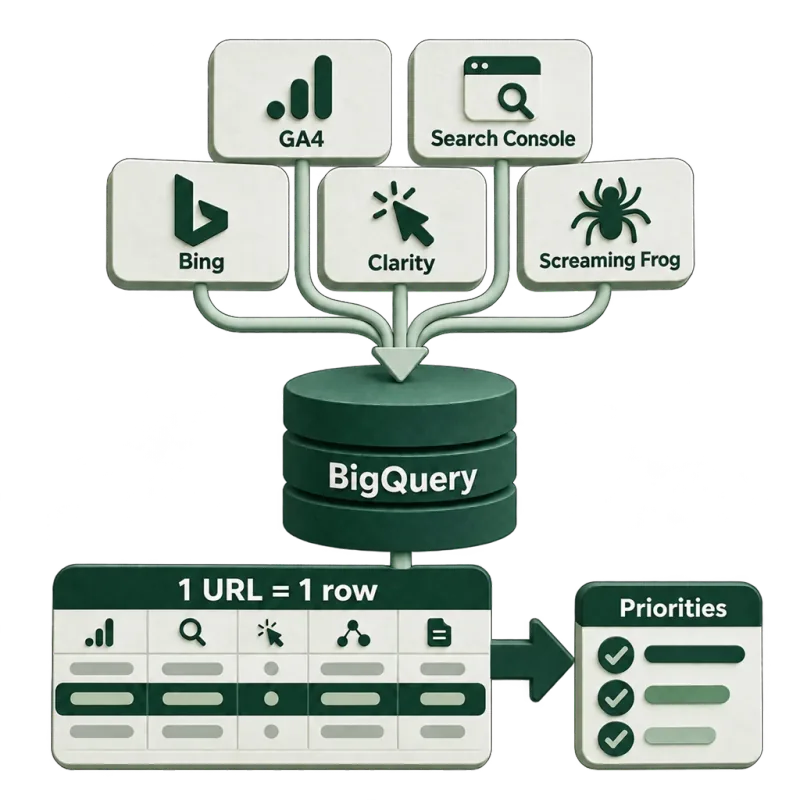
68%
of new-user demo and sign-up starts are linked to organic search
An SEO data warehouse from five sources
Five sources joined by URL in one BigQuery table showed which page to fix first, and how much SEO brings beyond the last click.
Case study: an SEO data warehouse in BigQuery
Own measurement, five sources in BigQuery, 30 days.
Pricing
I charge €50 an hour. The price comes from the hours, and the hours depend on how many conversions, how many ad platforms and what kind of website there is to measure. So these are examples for one website each, not a price list; I give you your own hours in writing after a short call.
Example: a lead generation company website, with forms and Google Ads
- 01
Audit and measurement plan
€300
6 hours · one-off
- 02
Setup and checks
Tag manager (Google Tag Manager or Cloudflare Zaraz), cookie banner and consent mode, GA4, Google Ads conversions, live test.
€400
8 hours · one-off
- 03
Monitoring
€100
2 hours / month
Example: an online store, about 5,000 products, Google Ads and Meta, with server-side tracking
- 01
Audit and measurement plan
€600
12 hours · one-off
- 02
Setup and checks
Tag manager (Google Tag Manager or Cloudflare Zaraz), cookie banner and consent mode, GA4 with purchase events, Google Ads and Meta conversions, server-side tracking, live test.
€900
18 hours · one-off
- 03
Monitoring
€200
4 hours / month
Optional add-on: Microsoft Clarity · 2 hours · one-off · €100Session recordings and heatmaps next to your measurement: setup, and connecting it to the cookie banner and GA4. The tool itself is free.
Optional add-on: BigQuery setup · 6 hours · one-off · €300Your GA4 data goes into the Google BigQuery data warehouse: turning on the export, the base tables, and connecting them to the reporting layer. You pay Google for storage and queries, by usage.Further sources into BigQuery · 2 hours per source · €100: Search Console, Google Ads, Meta (Facebook) ads, Microsoft Clarity. That puts search, ads and what visitors do on the page in one place.
Optional add-on: a report in Data Studio or Power BI · 8 hours · one-off · €400One report from your own data, answering the questions asked in discovery. Data Studio is Google’s reporting tool, formerly called Looker Studio.
Optional add-on: CRM connection · 6 hours · one-off · €300The lead’s source goes into the CRM (HubSpot or Salesforce, for example), and the closed deal gets back to Google Ads and Meta. Connecting one CRM and the ad accounts; the CRM subscription is not in the price.
The monthly server fee and paid tool subscriptions are not in the price: you pay those to the provider.
These are indicative budgets, not fixed prices. The platform, the number of templates, how the site is built and what the audit finds all change the final quote.
No VAT is added to these figures — I’m VAT-exempt under Hungarian law.
Developer work (the data layer) is priced separately.
What the monthly budget covers
Research, strategy, implementation or coordination with your developers, monitoring, meetings and reporting. Reporting time counts in the hours.
You get access to the project management tool, where you can see the priorities, who is responsible, progress and what comes next. Each month starts with agreed priorities and ends with a review of what changed and what the data shows.
Priced separately
Content writing and production, including an external writer if needed.
Outreach and digital PR. The audit includes the backlink analysis and recommendations.
Setting up or repairing measurement. The audit analyzes your existing data; new tracking and integrations are scoped separately.
Development beyond the agreed hours, including external developer fees.
AI search research or monitoring beyond the agreed topics, languages and AI systems.
Before you start
You receive a proposal with the scope, the estimated hours, the audit fee and the monthly budget. It also states whether the first phase includes implementation, when the ongoing work begins, and what your team needs to provide.
There is no lock-in. Any change to the scope or budget is agreed before the extra work starts.
Questions
How much does web analytics consulting cost?
I charge €50 an hour. The hours depend on how many conversions and ad platforms there are to measure: on a lead generation company website the audit and the measurement plan take 6 hours (€300) and the setup 8 hours (€400); on a store with 5,000 products, 12 and 18 hours (€600 and €900). Monitoring is billed monthly for the hours used, with no lock-in.
How big a gap between GA4 and the store is acceptable?
There is no single number, because it depends on how many people decline cookies, which payment methods you have, and where the traffic comes from. What can be said is how much of the gap is explained and how much is a fault. For that I reconcile the two systems order by order for a period.
Why does the CRM show something different from GA4?
Because they count different things. GA4 measures the form submission; the CRM records who became an actual lead. Between the two, test submissions, spam and forms sent twice drop out; in the other direction, anyone who called or emailed is missing from GA4. If the source doesn’t travel with the form, every lead in the CRM will be of unknown origin. In the audit I reconcile the two systems lead by lead.
Can an app or a plugin solve this without a consultant?
Often, yes: a good tracking app sends the standard events, and for a simple store that is enough. It falls short when several tags run side by side, the payment or the form is custom, or the numbers still don’t match after the app. Then the first job is finding what conflicts with what.
Will the fix break our running ads or the product feed?
I work so that it doesn’t. Before a change I check which campaigns optimize for which conversion, and what the feed relies on. I set the new measurement up next to the old one, and switch over only when the two agree.
Can you take over a setup someone else built, with no documentation?
Yes, most engagements start that way. First I map what fires and why, and write it down. What works stays; only what is broken, or what nobody can maintain, gets rebuilt.
Does a smaller website need server-side tracking?
Usually it isn’t the first step. Browser-side measurement has to be in order first: conversions, consent, double counting. Once that is done, and the missing data still matters next to your ad spend, it is worth working out whether the monthly server fee pays off.
Should we replace GA4 with another tool?
That is rarely the fix. If conversions are set up wrong or consent is broken, the new tool receives the same wrong data. Another tool comes up when the data has to stay on a European server or on your own (Matomo and Piwik PRO are of that kind), or when the company runs an enterprise system (Adobe Analytics, for example). With a switch, also look at how much the new tool locks you in.
Do we need a data warehouse, or is the GA4 interface enough?
For most companies GA4 and a reporting layer are enough. A data warehouse (BigQuery, for example) is needed when you want data from several systems in one table, further back in time, or want to ask a question the interface can’t answer. In that case I move your GA4 data into Google BigQuery; it is an optional add-on with its own price. Whether you need it is something we look at in discovery.
Will the cookie banner be legally compliant?
That isn’t mine to decide. I check that measurement does what the banner promises: no cookie is written after a decline, and it starts after an accept. Whether the wording and the setup meet the law is for your lawyer or your data protection officer to say.
Who runs measurement once you’re done: do we need an analyst?
Not necessarily. With the write-up and the measurement plan a marketer can read the reports, and I can do the monitoring in a few hours a month. An in-house analyst pays off when decisions are made from the data every day. An agency that specializes in measurement does when the work is continuous across several countries and systems.
Numbers don’t match, or you can’t tell which one to trust?
Tell me what you measure and what doesn’t add up, and I’ll tell you where I’d start.