SEO implementation
SEO implementation is the work of turning the recommendations of a search engine optimization (SEO) audit and strategy into shipped, checked changes on the website. I work in two ways: either your team builds from my task write-ups and I run the project, or I build the changes myself on the existing website. I implement the recommendations of generative engine optimization (GEO), measurement and conversion rate optimization in the same way.
When you need SEO implementation
SEO implementation is needed when you already know what should change on the website, and the change still doesn’t happen. These are the situations in which companies most often look for help:
The audit was finished, and it has been sitting since. There is a list of what should be fixed, and nobody to break it into tasks and do it.
Your developer doesn’t understand what SEO is asking for. The recommendation doesn’t arrive in a form one can build from, so it goes to the end of the queue.
Traffic or sales dropped after a redesign or a migration. The new site works, the numbers are worse, and nothing shows what was lost on the way.
You are about to migrate or rebuild. You don’t want to lose what the old site brought in from search.
Every small change needs a developer. The team can’t touch the site, or is afraid of breaking it.
The developer who built it is no longer available. Nobody knows exactly what is in the site, who has access, and what can be changed safely.
Project management or direct implementation: who builds it?
Project management and direct implementation are the two setups of SEO implementation: in one your developer builds, in the other I do. Which one fits depends on whether you have developer capacity, and on who may touch the system.
Project management. Your developer or agency builds. I write tasks from the recommendations, rank them, and run the work in a shared project management tool. I answer the developer’s questions, and after every release I check the live site. It fits when you have a developer, or when for security or contractual reasons nobody else may touch the system.
Direct implementation. I get access and build the changes myself: in the templates, in the content management system, in the code. It fits when you have no developer, or their time is needed elsewhere.
The two can be mixed. It is common for me to take the templates and the content while your developer takes the depths of the system, from the same backlog.
The split of roles is the same either way: the developer’s job is that the change works; mine is that what gets built is what search and the visitor need, and that this is checked on the live site.
From audit to backlog: what it takes for a recommendation to ship
An audit turns into shipped changes when its recommendations become tasks. An audit typically stalls because it contains findings, and a developer works from tasks. Five things keep it from stalling:
A recommendation becomes a task. A task says in which template, file or setting what has to change, and what done looks like. “Fix the headings” is a finding; making the product name the only first-level heading in the product template is a task.
Acceptance criterion. Every task carries a checkable statement of what must be visible on the live site. That is how the developer knows they are finished, and what I check against.
Ranking. I order the tasks by impact and effort. What is fixed in one template and affects thousands of pages moves up; what is a lot of work for little goes to the end, or off the list.
Dependencies. I write down what is needed from others: copy, a decision, access, another task. Most tasks get stuck on these, not on development.
Checking after release. A task is done when I have checked it on the live site, not when the developer closed it.
I work from other people’s audits too. If you hold a list from an earlier consultant, an agency or an SEO tool, I go through that and build the backlog from it; where the list is incomplete or out of date, I say so.
SEO implementation: what I build
SEO implementation means work on the website in six areas. What has to change in each, and why, comes from the audit; what follows is what I build from it.
Technical fixes. Redirects, canonical tags, indexing settings, robots.txt and the sitemap, internal links in the templates and the navigation. Where needed, I check in the server logs that search crawlers really crawl what we want them to.
Templates and HTML structure. Headings, meta data, structured data, breadcrumbs, pagination. I look at what the server sends and what JavaScript adds in the browser, because what a search engine doesn’t receive in the HTML it sees later or not at all. I build so that content and links are there without JavaScript too.
Speed. Images, fonts, the loading order of stylesheets and scripts, third-party code, caching and the content delivery network. The aim is for Core Web Vitals to improve for real visitors, on phones too.
Content in the content management system. New page types and templates, fields, category and menu structure, rearranging existing pages. You provide the copy, or we write it separately; I build what it appears in.
Measurement. The data layer in the code, wiring events into the tag manager, connecting the cookie banner and the consent management platform. I build what the measurement plan asks for.
Changes that affect conversion. Forms, landing pages, changes to the main buttons and the layout, where research or a test result calls for them. On a lead generation site this can mean more inquiries, in an online store more orders, if the change was a good one; whether it was is for measurement to show.
Platforms: WordPress, Shopify, Webflow, Astro and custom code
The platform decides what can be touched on a website and what can’t. These are the ones I work on:
WordPress. The theme, the templates, the plugins and the database are all accessible, so almost anything can be done. Much of the work here is finding out which plugin or page builder outputs what, and what conflicts with what.
Shopify. The theme code and the templates can be edited; the core of the system can’t. The URL structure and most of the checkout are fixed, so here the solution lies in the theme, the apps and the settings.
Webflow. Structure and content collections are shaped in the designer, and custom code can be added as embeds. There is no room for server-side logic, so whatever would need it takes an outside service.
Astro. The website is built from code, under version control, so every change can be traced and rolled back. Here content editing has to be set up so the team can work without a developer.
A custom JavaScript or PHP website. I work in the existing code, in your version control and by your release process. The first step here is always understanding how the system is put together: framework, database, connections to outside systems.
If the website runs on another system, or is part of a web application, I say on the first call what I can take on directly, and what through project management, with your developer.
Redesign and migration: what depends on implementation
A redesign or a migration is the riskiest moment in a website’s life as far as search is concerned, and much of the damage is an implementation fault: something that was there on the old site is quietly missing from the new one. I work on five points:
Content inventory. I map what is on the old site: every URL that receives traffic or links, including those missing from the sitemap. This shows what stays, what merges, and what goes.
Content migration. Copy, images, meta data and structured data move into the new system. This is typically more work than the plan allows for, so its cost is best treated as a separate item.
What gets lost quietly. A heading, breadcrumbs, structured data, internal links, embedded apps, tracking code. Their absence doesn’t show in the editor, only in the code of the live page. I compare the new templates with the old ones element by element.
Go-live. The new site comes together in a staging environment first, closed to search engines. A cutover plan is written: what happens in what order, who checks what, and what the way back is if something doesn’t work.
Checking after go-live. I watch the redirects, indexing, measurement and the rendering of the main pages from day one, and add the faults to the shared backlog.
Mapping old URLs to new ones and the redirect plan are part of technical SEO; implementation builds and checks what that plan contains.
A new website from scratch: when I build one
I build a new website from scratch when the existing one is no longer worth fixing, or there is no website yet and it has to work from day one the way search, measurement and the visitor require. This is what to expect:
I work from a finished design. The visual design comes from your designer; I build it, and say where the design hurts search, speed or usability. At the handoff between design and development I think in components and a design system, not in individual pages.
The content model is the foundation. First we settle which content types exist, with which fields, and how they relate. Templates and reusable components come from that, and that is what later lets the team edit the site without a developer and without breaking it.
What is in from day one. Search engine optimization, generative engine optimization, measurement and conversion, responsive layout, an accessible structure following the Web Content Accessibility Guidelines (WCAG), and where needed, handling of several languages and countries. Which accessibility rules apply to your website is for a lawyer to say.
We decide the architecture together. An off-the-shelf system or custom development, a traditional setup or separate presentation and content management: this is best decided by the team, the budget and the upkeep, not by fashion. Where possible we start with a narrower first version and build on it.
I don’t take on user research or design in this work; if the plan lacks them, they have to be done beforehand.
How I work: the SEO implementation process
SEO implementation has seven steps for me, and the work moves in small releases that can each be checked on their own.
The main workspace is a shared project management tool: every task sits there with its description, its acceptance criterion and its status, so it is visible at any time what is done and what is waiting on what. Artificial intelligence (AI) tools and my own processes help with preparing task write-ups, reviewing code and checking, so more fits into an hour; I check what I release myself.
01
Discovery and access
The first step is understanding what the website runs on, who works on it, and how a change gets released today. I receive the audit or the list of recommendations, and access to the systems needed. Access, code and accounts stay yours; I ask for revocable access in my own name, not a shared password.
02
Backlog
The recommendations become tasks with a description, an acceptance criterion and a rank. Together we decide what goes to your developer under project management, and what I build.
03
Implementation
Changes are made in small batches, so the cause of a fault can be found quickly. Where there is version control and an automated release process, I work within it; where there isn’t, a backup is taken before every change.
04
Checking in staging
Before go-live I check that the change does what the task asks, and that it hasn’t broken anything else: how the page works, how it looks on a phone, speed and measurement. I walk through the main paths, an order or a form submission for example.
05
Go-live
We agree the time of go-live so that someone is watching. For a bigger change I write down the order of steps and the way back.
06
Checking after go-live
On the live site I check every task against its acceptance criterion, and over the following weeks I watch what Search Console and web analytics show. I record the result on the task, so that later it is still visible which change brought what.
07
Maintenance
The website keeps changing after the work: updates, new pages, new campaigns. I take on maintenance for a monthly fee: updates, smaller changes, watching availability, and regular checks that what was fixed once stays fixed.
Proof
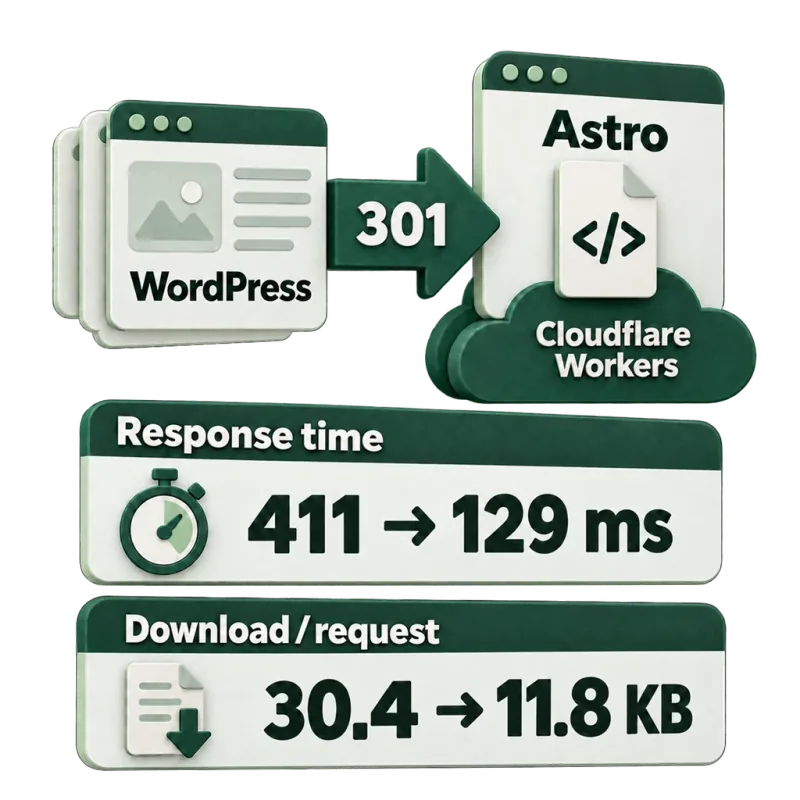
411 → 129 ms
Googlebot response time
WordPress to Astro: what Google saw
kk.coach moved from WordPress to static Astro pages on Cloudflare Workers. The response time Googlebot measured fell from 411 to 129 ms, and 37 of the 40 sitemap URLs appeared in search within 24 days.
Case study: WordPress to Astro migration
Own measurement · kk.coach · Google Search Console

2 days
from scratch to a live website
A pre-order website on WordPress for a municipal apple market
A one-page pre-order website with a custom order form, pick-up time slots, a real-time summary for the organizers and automatic emails. Nobody had to add up the orders by hand.
Pricing
The hourly rate is €50. The price comes from the hours, and the hours depend on the size of the backlog, what the website runs on, and who builds the changes. What follows are therefore examples for one website each, not a price list; I give you your own hours in writing after a short call.
Example: a company website with its own developer and a finished audit (project management)
- 01
Backlog from the audit
The recommendations broken into tasks, with a description, an acceptance criterion and a rank, in the shared project management tool.
€400
8 hours · one-off
- 02
Project management and checking
Working with the developer, checking releases on the live site, keeping the backlog up to date.
€300
6 hours / month
Example: a WordPress company website without a developer, with a finished audit (direct implementation)
- 01
Backlog from the audit
The recommendations broken into tasks, ranked.
€300
6 hours · one-off
- 02
Implementation and checking
Building the backlog in the templates and the content management system, checking in staging and live.
€1,000
20 hours · one-off
- 03
Maintenance and further changes
Updates, smaller changes, regular checks.
€200
4 hours / month
There is no example price for a new website from scratch: I give a written quote after a call, once the design and the content are known.
Hosting, the content delivery network, paid plugins, apps and subscriptions are not included: you pay those to the provider. When choosing a platform it is worth counting the total cost of ownership: besides the build, the licenses, hosting, integrations and maintenance.
These are indicative budgets, not fixed prices. The platform, the number of templates, how the site is built and what the audit finds all change the final quote.
No VAT is added to these figures — I’m VAT-exempt under Hungarian law.
What the monthly budget covers
Research, strategy, implementation or coordination with your developers, monitoring, meetings and reporting. Reporting time counts in the hours.
You get access to the project management tool, where you can see the priorities, who is responsible, progress and what comes next. Each month starts with agreed priorities and ends with a review of what changed and what the data shows.
Priced separately
Content writing and production, including an external writer if needed.
Outreach and digital PR. The audit includes the backlink analysis and recommendations.
Setting up or repairing measurement. The audit analyzes your existing data; new tracking and integrations are scoped separately.
Development beyond the agreed hours, including external developer fees.
AI search research or monitoring beyond the agreed topics, languages and AI systems.
Before you start
You receive a proposal with the scope, the estimated hours, the audit fee and the monthly budget. It also states whether the first phase includes implementation, when the ongoing work begins, and what your team needs to provide.
There is no lock-in. Any change to the scope or budget is agreed before the extra work starts.
Questions
Do you work from an audit someone else made?
Yes. I go through the list, break it into tasks, and flag what is incomplete, out of date, or what I disagree with. You don’t need to order a new audit for the existing one to get done.
Can you work with our developer or our agency?
Yes, that is what the project management setup is for. I fit into their process: I can work in their task tracker and by their release schedule. My responsibility is that the task is clear, and that the released change is what the recommendation asked for.
What access do you need, and who keeps the code?
As much access as the task requires: editor or developer access to the website, read access to Search Console and web analytics. I ask for revocable access in my own name. The code, the hosting and every account are yours, and they are with you at the end of the work too. If the website handles personal data, I access only what the work needs; whether that takes a separate agreement under the General Data Protection Regulation (GDPR) is for your lawyer to say.
Will we lose traffic if we change platform?
You don’t have to, but the risk is real, and it depends on implementation. Traffic falls when old addresses aren’t redirected, when content or structure changes on the way, or when the new templates lack something the old ones had. These can be mapped in advance and checked after go-live. I don’t promise that nothing moves.
Should we fix the existing website or build a new one?
It usually makes sense to start with fixing, because it costs less and carries no migration risk. A new website is justified when the change you need can’t be made in the current system, when accumulated technical debt makes every modification disproportionately expensive, or when the platform locks you in so that you can’t move on. That can be said at discovery, from the backlog.
Will the team be able to edit the site without a developer?
That is the aim. I build so that everyday work, that is changing copy, adding a page or a blog post, needs no developer, and so that an editor can’t break the structure. Where the system doesn’t allow that, I say so, and we work out the smallest change that solves it.
Does a plugin, an app or an AI tool solve this?
Part of it, yes. A plugin handles the usual settings; an AI tool writes a template or a redirect list. None of them knows what matters on your website, what conflicts with what, or whether the released change really does on the live site what it should. I use such tools too; the checking is the part that can’t be skipped.
Who maintains the site after the work?
You can, from the write-ups, or I take it on for a monthly fee: updates, smaller changes, regular checks. If you have your own developer, maintenance stays with them, and I watch the part that affects search and measurement.
Do you do security and accessibility checks?
As much as belongs to implementation. I see to it that the website runs over an encrypted connection, that the system and the plugins are up to date, and that what I build opens no security hole; for accessibility I look at structure, contrast and keyboard use. A full security test and a formal accessibility audit are done by a firm that specializes in them; if you need one, I build in their findings.
How much work is it to implement an audit?
It depends on the length of the list and on the system. On a company website the backlog takes 6–8 hours and direct implementation about 20 hours; under project management a few hours a month, on top of the developer’s time. For a large catalog or a custom system it is more. After discovery I give hours, task by task.
Next step
You have the list, and nobody to do it?
Send me the audit or the recommendations, and tell me what the website runs on and who works on it. I’ll tell you how I would go about it.